카테고리 없음
비전 화면 붙일 때 필요한 컨트롤 추가하는 방법
joo_coding
2025. 11. 26. 21:31
화면 붙일 때 필요한 컨트롤 추가하는 방법
도구상자 오른쪽 마우스 > 항목선택 > 필터에 'cvs' 검색
엔터누르지말고 기다리면 4개가 뜸
그 중에 위에 2개 선택하고 확인 누르면 됨


컨트롤 더블클릭하면 Form에 알아서 추가됨
namespace vision
{
    public partial class Form1 : Form
    {
        string address = "192.168.0.14";
        string username = "admin";
        string password = "";
        bool forceConnect = false;

        public Form1()
        {
            InitializeComponent();
            cvsInSightDisplay1.Connect(address, username, password, forceConnect);
            //cvsInSightDisplay1.InSight
        }
    }
}

텔넷 켜고 cmd에 telnet 아이피주소 치면 아래와 같이 나옴
기본 Username은 admin 치면 되고, 기본 암호는 비어있으니 그냥 엔터치면됨
se8 명령어는 새로고침이랑 똑같음 ( 프로그램 실행했을때에는 F5 누르면됨 )
Put Live f라고 cmd에 명령어 입력해도 됨
F5 = se8 = Put Live
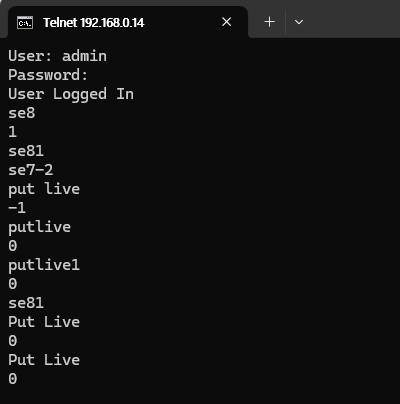

1은 true code이고, 0은 false code임
-2랑 -1도 있음
이거는 모르겠으면 Cognex Command 이런식으로 검색하면 공홈에 무슨 뜻인지 다 나옴
Set Event
Set Event Triggers a specified event in the EasyBuilder through a Native Mode command. Note: If the In-Sight vision system will be configured to accept an acquisition trigger from a PLC/Motion Controller via a Native Mode command, Cognex recommends that th
support.cognex.com